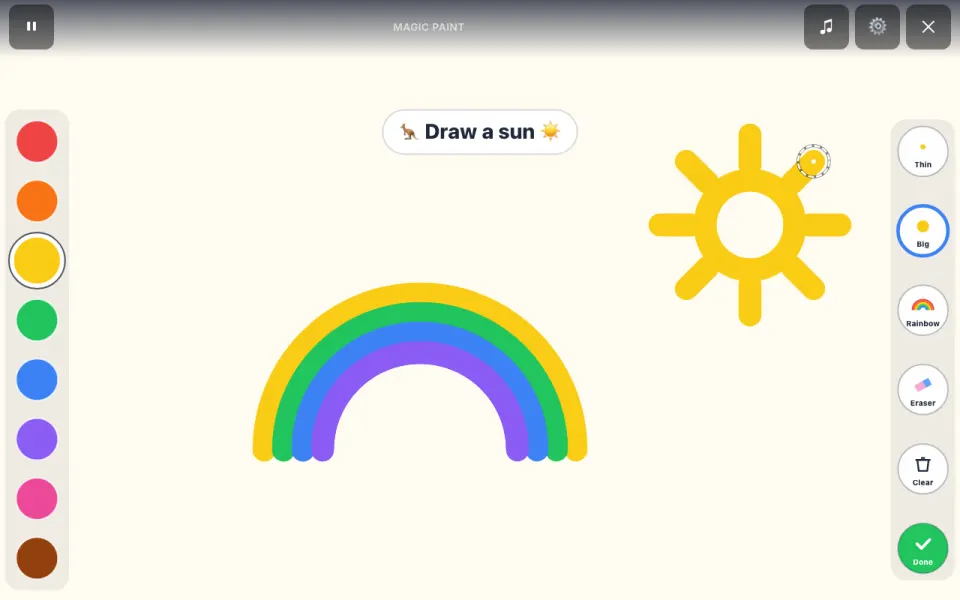
The short answer: Magic Paint is the draw-in-the-air game in Hoppo. The webcam follows your kid's arm, so it works standing back from the screen: reach the arm out straight and it paints, bend it and it stops. Colors and brushes are big buttons you "press" by holding a hand over them. There's no timer and no score; when the picture is done, press Done and save it.
What's on the palette
- Eight colors: red, orange, yellow, green, blue, purple, pink and brown.
- Brushes: Thin, Big and Rainbow (the color changes as you paint).
- Eraser for a slip, and Clear for a fresh page. With the camera, Clear needs a longer hold so a picture isn't wiped by accident.
Hoppo's ideas
For kids who freeze at a blank page, Hoppo suggests something to draw: a sun, a rainbow, your favorite animal, a flower, a house, a happy face, a fish or "anything you like". After a little painting Hoppo cheers ("I love it!") and offers the next idea. Kids can ignore the ideas completely.
Saving the picture
Done shows the painting on its own with a "Save picture" button, which downloads it to the device as a PNG named with the date. The saved picture is only the paint on a plain paper background, never the camera image, and nothing is uploaded. The results line counts strokes and colors instead of a score.
What it's good for
Magic Paint is open-ended drawing with no right answer: planning a picture, choosing colors and controlling a finger in the air. That fingertip control is the same skill Letter Trace uses for letters, so it's a relaxed warm-up before tracing. It suits quiet time, early finishers and sitting-down play.
Camera or touch
- With the webcam: sit or stand 2-4 feet from the camera and paint over your own camera picture.
- By touch: on a phone or tablet, paint with a finger on a paper-colored page and tap the buttons.
Tips for grown-ups
- Show the "open hand" first. Stopping is the hardest part; practise point, paint, open hand, stop.
- Plain background, good light. A busy background or a dark room makes the hand harder to follow.
- Hover to press. Buttons need a hand held over them until the ring fills, which stops accidental presses.
- Make a gallery. Saved pictures are ordinary image files you can print or keep.
More Hoppo games to try next
-
-

Silly Faces
Face filters that copy you: animals, heroes and funny-face challenges.
-

Grow a Pet
Warm an egg with your moves today; it hatches on tomorrow’s visit.
See all Hoppo games. Teachers can find QR codes and schedules in the free Teacher toolkit; for a calm bedside game see hospital bedside games.